.jpg?width=1000&height=162&name=toodledo_logo%20(1).jpg "toodledo_logo (1)")
Advancements in Mobile Management Softwares Empowering Productivity
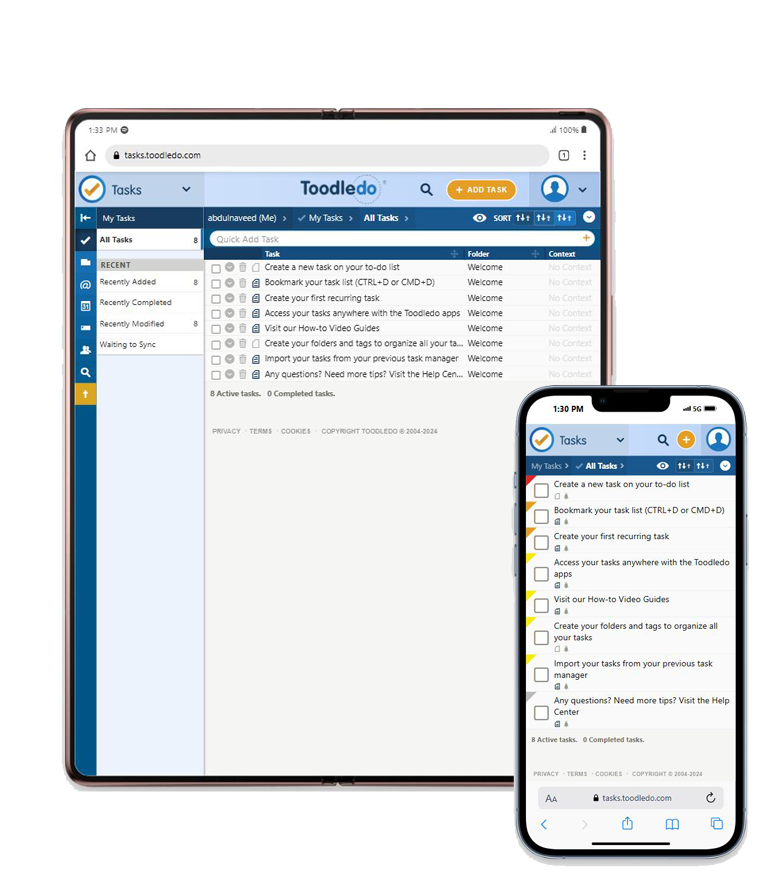
Mobile apps are transforming the way individuals and teams handle complex tasks, in the present times of digital era. One area seeing tremendous growth is design management software, a category of tools that allows designers, developers, and project managers to streamline their workflows. As more professionals rely on mobile devices for both work and collaboration, advancements in mobile-based management software designs are providing new levels of accessibility and flexibility.
The Evolution of Design Management Software
Design management software was traditionally desktop-based, catering to specialized professionals working in office environments. However, with the shift towards remote work and the growing need for mobility, mobile apps for design management have become essential. These advancements are not just about making the software available on mobile devices but ensuring that the user experience is optimized for smaller screens without losing functionality.
Modern management software designs for mobile is built with several key features that enhance productivity, including:
Task Management:
Managing design projects often involves tracking multiple tasks, deadlines, and deliverables. Mobile apps now offer robust task management features, allowing users to create, assign, and track tasks on the go.
Real-Time Collaboration:
Teams can now collaborate in real-time, providing feedback, sharing design assets, and making changes, all within the app. This reduces the need for back-and-forth emails and improves overall efficiency.
Cloud-Based Access:
One of the most significant advancements is the seamless integration of cloud storage. Users can access files from anywhere, ensuring that their work is not limited by device or location.
What is Toodledo?
Toodledo is a versatile productivity tool designed to help individuals and teams manage tasks, track habits, organize notes, and outline complex projects. Originally a task management platform, Toodledo has evolved to offer a range of features that are highly adaptable to different workflows, including those in the creative and design industries.
While not specifically created as design management software, Toodledo provides many key features that make it a powerful solution for managing design-related tasks and collaborating with teams. Available on both web and mobile platforms, Toodledo enables users to stay organized and productive whether they’re at their desks or on the go.
The tool is especially helpful for design professionals because of its customizable approach to task management. Designers, project managers, and teams can organize tasks using tags, folders, due dates, and contexts, making it easy to break large design projects into manageable chunks. Additionally, Toodledo offers subtasks, goal tracking, habit logging, and real-time collaboration, making it an essential app for anyone involved in managing design workflows.
Toodledo’s Role in Design Management Software
When it comes to productivity tools that support design workflows, Toodledo stands out for its versatility and wide range of features. Although Toodledo isn’t strictly categorized as management software designs, it offers various functionalities that are perfect for managing design projects, organizing tasks, and facilitating collaboration across teams. Let’s take a deeper look into how Toodledo supports mobile design management:
Comprehensive Task Management
Toodledo’s core strength lies in its task management capabilities. Designers and project managers can create tasks with detailed descriptions, set deadlines, assign priorities, and even break them down into smaller subtasks. This is essential for design projects that often involve multiple phases, like brainstorming, prototyping, reviewing, and finalizing.
The software allows users to categorize tasks using folders, tags, and contexts, making it easier to sort and filter tasks based on specific design projects or team responsibilities. This ensures that no task slips through the cracks and that deadlines are met.
Subtasks for Project Breakdown
Design projects can be complex, often requiring teams to juggle multiple deliverables. With Toodledo, users can break larger tasks into manageable subtasks. For instance, a project like "Designing a Website" can be split into smaller subtasks, such as "Create Wireframes," "Review UI Design," "Prepare Final Assets," and "Client Feedback." This breakdown allows teams to track progress incrementally and ensures that every aspect of the project is accounted for.
Goal Tracking and Time Management
For design teams working on time-sensitive projects, tracking time and setting goals are crucial. Toodledo allows users to set daily or long-term goals, which can be tied to specific tasks. Design managers can monitor the team's progress toward these goals, ensuring that work stays on schedule.
Toodledo also offers time tracking, which enables designers and managers to estimate how long tasks will take and compare them with the actual time spent. This is a great feature for design teams that bill clients by the hour or need to optimize their workflow to meet tight deadlines.
Habit Tracking for Creative Routines
In addition to task management, Toodledo includes a unique habit-tracking feature that helps individuals monitor personal or team routines. For designers, maintaining creativity often requires consistent habits, like sketching daily, brainstorming, or exploring design trends. With habit tracking, users can log and measure these activities to ensure they’re meeting personal or team development goals.
Customizable Views and Filters
One of Toodledo’s standout features is its highly customizable views. Users can know that how tasks are displayed based on priority, due dates, tags, or project folders. This flexibility is particularly useful for design teams who need to see their tasks in a specific order or filter tasks by client, project type, or design phase.
The ability to create custom filters and save views means that users can focus on what's most important without being overwhelmed by an entire list of tasks. Whether you need to see only urgent client projects or focus on upcoming deadlines, Toodledo can adapt to your needs.
Real-Time Collaboration
Collaboration is at the heart of every successful design project. Toodledo allows users to share tasks, lists, and even entire projects with team members. This feature ensures that everyone is on the same page, whether it’s the designer, project manager, or client. The shared task lists can be updated in real-time, so as progress is made or feedback is provided, the team is always up to date.
Toodledo also enables task assignments, making it easier to delegate tasks to team members, track their progress, and ensure accountability within the design process. It’s an effective way to coordinate efforts, especially when working with remote teams.
Mobile Accessibility
With its mobile app available for both iOS and Android, Toodledo ensures that users can manage their tasks and projects from anywhere. The app is designed to provide the same level of functionality as the desktop version, allowing users to create, modify, and track tasks on the go. For designers who are constantly moving between client meetings, design studios, and remote work environments, this mobile accessibility is key.
Toodledo’s mobile app allows design professionals to keep their projects organized and ensures that no deadlines or important updates are missed, no matter where they are.
The Future of Mobile Management Software
The future of mobile-based management software designs looks promising, with innovations continuing to blur the lines between desktop-level capabilities and mobile convenience. Here’s what we can expect:
Augmented Reality (AR) and Virtual Reality (VR):
As AR and VR technologies mature, design teams will be able to create and collaborate in entirely new ways, directly from their mobile devices. This will revolutionize product design, prototyping, and client presentations.
AI-Powered Automation:
Artificial intelligence is already playing a role in design management, helping automate repetitive tasks and optimize project timelines. We can expect mobile management software designs to harness AI even further, reducing manual effort and improving decision-making.
Enhanced Security Features:
With more work being done remotely, securing design assets and intellectual property is critical. Future advancements will likely focus on ensuring the highest levels of encryption and security, even on mobile platforms.
Integrated Ecosystems:
Modern mobile apps will increasingly integrate with other essential tools, including graphic design software, project management suites, and communication platforms, creating a more unified design management experience.
Conclusion
Mobile-first solutions are paving the way for greater flexibility and collaboration in design management. As advancements in design management software continue to emerge, tools like Toodledo offer designers and project managers the ability to streamline their workflows on the go. With real-time collaboration, powerful task management features, and seamless cloud integration, mobile apps are making it easier than ever to manage complex design projects from anywhere in the world.
For those seeking an efficient way to manage design tasks without being tied to a desktop, the future of mobile design management software is here, and it’s only getting better. Whether you are managing a design project or collaborating with a team, mobile tools are revolutionizing how we approach design, project management, and productivity.